Guides
How to Use Voice Input to Turn Fragmented Speech into Structured Notes
A practical voice‑input workflow that turns scattered spoken updates—including revisions, owners, deadlines and next steps—into clear, editable, structured notes.
Typeoff Team August 21, 20269 min read

Ideas rarely appear as complete sentences. In a project‑status sync you might start with a status, change your mind halfway, jump to an obstacle, and only at the end remember the deadline that should have been mentioned first.
That’s normal spoken communication, and it’s why raw transcripts are often unsuitable as work notes.
The real value of voice input isn’t just preserving every utterance in order. Our goal isn’t a verbatim record of the thinking process; it’s a readable, reviewable draft that can be edited further: it keeps the essential facts, gives the information a sensible structure, and makes mistakes easy to spot.
In this article we’ll show how to use AI‑powered voice input to turn fragmented speech into a structured note, while still emphasizing the importance of a human review.
Why Voice Notes Are Often Harder to Use Than Expected
You speak quickly because you don’t have to formulate each sentence before you start. You can pause, restart, add details, or correct yourself on the fly.
But a truly useful note must present clear relationships:
- Which tasks are finished?
- Which are in progress?
- What are the current blockers?
- Who owns each task?
- Which date is the most recent?
- What are the next steps?
Traditional transcripts preserve speaking order; work notes preserve the information needed for the next decision. They are related but not the same outcome.
For example, here is a spoken status update:
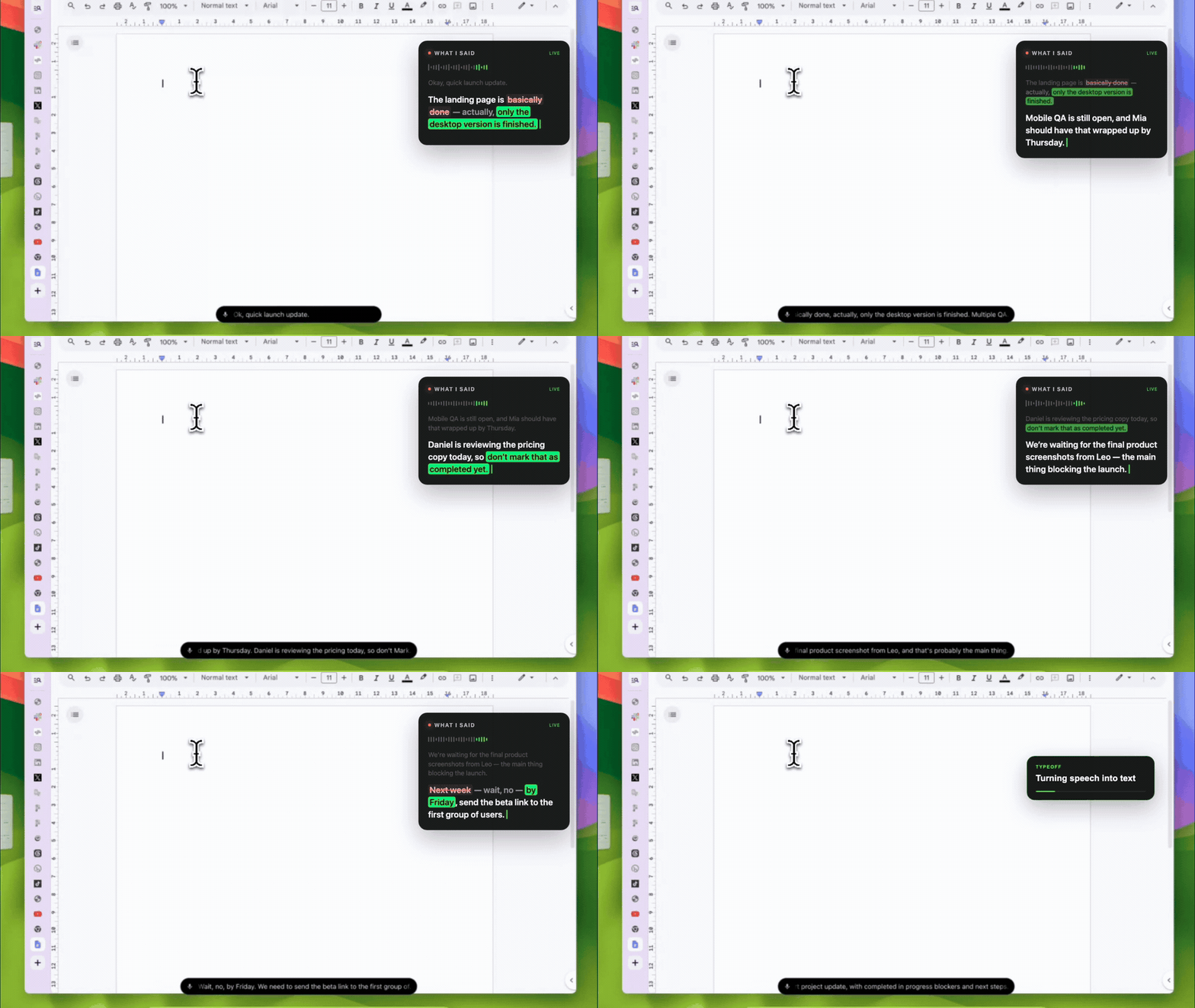
The landing page is basically done—actually, only the desktop version is finished. Mobile testing is still pending; Mia should wrap it up by Thursday. Daniel is reviewing the pricing copy today, so don’t mark that as complete yet. We’re waiting on Leo for the final product screenshots. Next week—wait, no, by Friday we need to send the test link to the first batch of users.
The passage is understandable, but the reader has to extract the status, owners, dependencies and the corrected deadline themselves. When the note will be reused later, clarity often matters more than preserving every pause.
From Transcript to Structured Note: Enabling the Next Action
The two formats differ mainly in what they optimise for.
| Raw transcript | Structured work note |
|---|---|
| Keeps content in spoken order | Groups related information |
| May retain revisions and repetitions | Distinguishes current facts from discarded statements |
| Leaves the reader to infer task status | Explicitly marks status when needed |
| Owners and dates can be buried in paragraphs | Makes owners and dates easy to scan |
| Prioritises audio fidelity | Prioritises readability and downstream processing |
Neither is inherently better. When exact wording is critical, a verbatim transcript is appropriate; for personal thinking, project updates, briefings, planning and follow‑up, a structured note is usually more usable.
The key is to decide up front which result you need.
Give Voice Input a Goal, Not a Script
Many people try to dictate a pre‑written article word‑for‑word. If the narrative is already fixed, that works, but it defeats the advantage of speaking.
A more practical approach is to state the desired outcome first:
Turn this into a short project status, split into Completed, In‑Progress, Blockers and Next Steps.
You don’t need to pre‑plan every sentence; you only tell the system what kind of document the speech should become.
Common goals include:
- A brief project status
- Meeting minutes with decisions and action items
- A concise request email
- An bug report with expected behaviour, actual behaviour and reproduction steps
- Research notes organised by theme
- A work log that lists progress, issues and next steps
The structure should serve the task. If two sections are enough, there’s no need to force five. The format only adds value when it helps the reader use the information.

How to Turn a Fragmented Speech Segment into a Usable Note
1. State the purpose first
In one sentence, tell the system what document you want.
For example:
Quick sync on the release status. Please organise the content into Completed, In‑Progress, Blockers and Next Steps.
You can place the requirement at the beginning or add it after you finish speaking; the important thing is to make the request clear.
2. Speak the facts, not the article order
When a piece of information comes to mind out of sequence, don’t stop to reorder yourself. Just record the fact:
- Current status
- Owner
- Deadline
- Dependencies
- Decisions made
- Next actions
The first pass is about capturing information. Once the text appears on the screen you can rearrange it later.
3. Signal revisions explicitly
If a fact changes mid‑sentence, use a clear correction cue:
The review is scheduled for next week—wait, no, the test link needs to go out by Friday.
Phrases like “actually”, “correction”, or “wait, no” are easier for the system to recognise as a revision than silently repeating a new detail.
Typeoff’s AI enhancement can recognise many self‑corrections, strip filler words, add punctuation and tidy lists, but the output still depends on phrasing, context, language settings and writing style, so the corrected facts must always be verified.
4. Keep owners next to their tasks
“Mia is responsible for mobile testing” is easier for the system and the reader than mentioning Mia, then a few sentences later stating the task.
The same applies to dates and decisions:
- “Daniel is reviewing the pricing copy today.”
- “Leo will provide the final screenshots.”
- “Send the test link by Friday.”
Short, explicit relationships aid both the AI and the human reviewer.
5. Insert the text right where you need it
When you use Typeoff, the processed text is inserted at the cursor location in the current text box. Your note can therefore appear directly in the document, chat or project tool where you’ll continue working, instead of first landing in a separate recording app and later becoming a new to‑do item.
This workflow’s advantage is continuity: you can speak a rough draft, review the result next to the existing context, and then fine‑tune it with the keyboard.
6. Double‑check the high‑risk details
Before treating the result as a record or sending it to others, read it through at least once. Pay special attention to items that, if wrong, would change the work:
- Names and technical terms
- Dates, times and quantities
- Negations such as “do not mark as complete”
- Owners
- Revised statements
- Commitments and decisions
This step doesn’t mean the voice input failed; it’s the same editorial review you would perform on any first draft.
What the Demo Got Right and What Still Needs Review
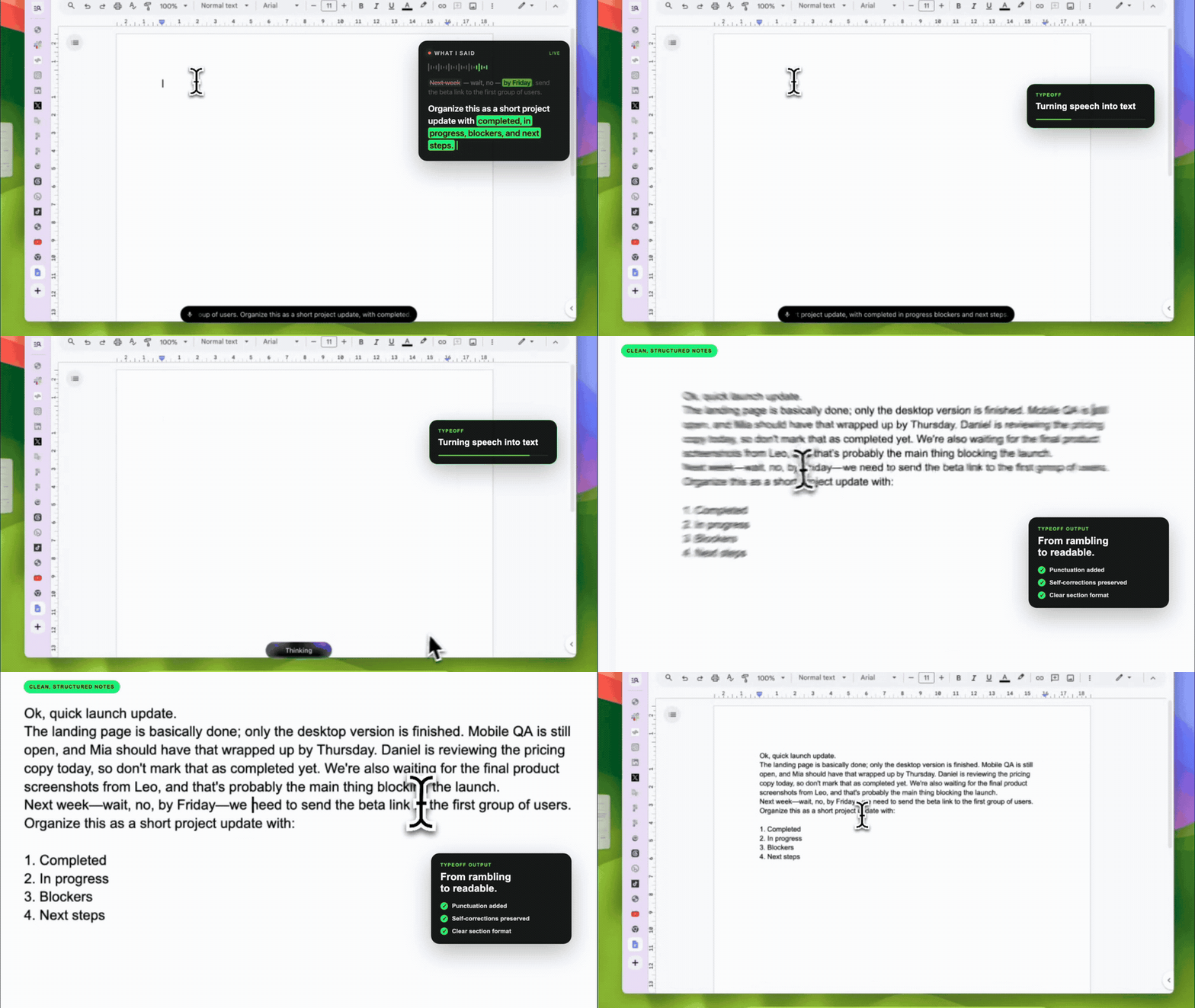
The video demo includes several tricky elements:
- A status that is corrected immediately after being spoken
- Three clearly identified owners
- Tasks at different stages
- One blocker
- A deadline that changes mid‑sentence
- A four‑section formatting request
The final output adds punctuation and the requested section headings, making it far easier to read than a continuous monologue. It also shows why review can’t be skipped: some corrected phrases may remain in the result instead of being merged into a single conclusion.
That doesn’t diminish the demo’s value. A real voice workflow should be judged by whether it shortens the distance from “idea” to “usable text”, not by whether a single showcase is flawless.
A good first draft should let you:
- Understand the current update quickly
- Spot any errors or omissions
- Make only minor edits
- Move on to the next task

Scenarios Where This Workflow Shines
Project status
Explain what changed, who owns the remaining work, what’s blocking progress and what the next step is. After reviewing, send the note to the team channel.
Meeting follow‑up
Right after a meeting, while the details are still fresh, dictate the decisions. Instead of a vague “summary”, ask for a list of decisions, owners, open questions and action items.
Brain dump
Capture ideas first, then organise them. You can request a short outline, thematic grouping, or next‑step research questions, while keeping uncertain judgments marked as tentative.
Email draft
Speak the background, decision and request, then ask for a concise email. Review tone, dates, names and commitments before sending.
Technical notes
Voice works for surrounding explanations, but for code, commands, identifiers and exact error messages you should still type. Voice and keyboard complement each other.
A Practical Checklist
Before keeping or sharing a voice note, verify each item:
- Does the note include my last correction?
- Are names, dates, numbers and deadlines accurate?
- Are unfinished tasks clearly separated from completed ones?
- Are owners matched to the correct tasks?
- Does the format actually clarify the information rather than just add headings?
- Have I avoided turning speculation into asserted facts?
- Could someone who didn’t hear the original speech understand the next action directly?
If the answer to the last question is yes, the note has done its job.
Treat Voice Input as a Draft System
The most useful voice workflow isn’t “say it once and never edit again”; it’s:
Speak the idea → Get a readable draft → Verify critical details → Continue working.
This sequence respects the strengths of both input modes. Voice excels at capturing thought, context and incomplete connections; text excels at verification, comparison and precise editing.
Typeoff bridges the two: after you speak naturally, the text appears at the cursor; optional AI enhancements handle punctuation, filler removal, self‑corrections and structuring. The final meaning always remains the user’s responsibility.
If your notes always start from a fragmented utterance, don’t wait for a perfectly polished sentence before you speak. Get a rough version out first, then let the result evolve into something usable.
Learn about Typeoff AI enhancements or download Typeoff.
FAQ
Can voice input turn spoken words into a structured note?
Yes. AI voice‑input tools can add punctuation, strip filler words, recognise some self‑corrections and organise lists or paragraphs. The output still depends on the spoken prompt, context, settings and audio quality, so names, dates, decisions and revised details must be reviewed.
Is a voice note the same as a transcript?
Not necessarily. A transcript aims to preserve everything said and its order; a work note can consolidate related facts, trim verbal fluff and highlight decisions or next steps.
How should I dictate a project status?
First state the desired format, then provide the current status, owners, deadlines, blockers, decisions and next actions. Clearly signal any revisions and review the result before sharing.